RISC OS Technologies

RISC OS, frosted — ROMs, desktops and documentation from RISC OS Technologies

News Downloads Boot RISC OS Status Gallery Documents Forums Bugs Search About

RISC OS One News


RISC OS 64 is born

Posted by RISC OS One Sun, 04 Oct 2026 21:00:00 GMT

RISC OS 64 is born, and we will be demonstrating it at the RISC OS London Show on Saturday 24 October 2026.

The RISC OS 64 desktop: the Apps window open with !Alarm, !Chars, !Draw, !Edit, !Help and !Paint, the icon bar along the bottom, and the About the Operating System window reading RISC OS 64, RISC OS Renaissance Team 2026, version 10.00 (04-Oct-26)

That's the desktop, with the familiar applications in the Apps window and the icon bar along the bottom. Its About the Operating System window reads RISC OS 64, version 10.00, dated 4 October 2026, from the RISC OS Renaissance Team.

RISC OS 64 is updated and written by a team of 5 Programmers under the RISC OS Renaissance Team and backed by RISC OS Developments Ltd.

Come and see it running at the show: 11am to 4pm at the Harrow District Masonic Centre, Northwick Circle, Kenton, Harrow HA3 0EL. Details are on the RISC OS London Show website.

no comments

Boot RISC OS 3.71 in your browser

Posted by RISC OS One Sun, 27 Sep 2026 23:00:00 GMT

There is a RISC OS desktop on this site now. Boot RISC OS starts RISC OS 3.71 — the RiscPC desktop of 1996 — in your browser. Nothing to install and no plug-ins, and the hard disc keeps what you leave on it.

The RISC OS 3.71 desktop, with a Filer window open on the hard disc and the Filer menu showing its Display and sort options

The Wimp and its window furniture, the icon bar, the Filer, the Pinboard and the Task Manager are all there, along with a BBC BASIC V interpreter. The applications are ports of the original sources: !Draw, !Paint, !Edit, !Chars, !Alarm, !Help, !Configure, !SciCalc, !Maestro, !ChangeFSI and the Diversions games among them.

Open the hard disc and start with $.Docs, which explains what this desktop adds to RISC OS 3.71. Use a recent Chrome, Firefox or Safari, and remember the Acorn button order — Menu is the middle button.

RISC OS 3.71 is © Acorn Computers Ltd 1987–1997, and the applications keep their original authors' credits. The full list is on the Boot RISC OS page.

no comments

!Connect: a VNC suite for RISC OS, Mac, Windows and Linux

Posted by RISC OS One Sun, 20 Sep 2026 02:00:00 GMT

!Connect is a VNC suite for RISC OS, Mac, Windows and Linux, and it is coming soon.

It is built with VideoX acceleration: no more VNC lag, and smooth viewing on any platform.

A whole RISC OS desktop running live inside a !Connect window on macOS, at 2560 by 1440 over the local network

A whole RISC OS desktop, live in a window on the Mac.

The !Connect connection window, with host, port and password, a list of saved sessions, and machines discovered on the network

The connection window remembers your machines: save a session by name, or pick one that has been found on the network. There is no release date yet — it will be announced here.

no comments

Three OpenGL windows at once on the RISC OS desktop

Posted by RISC OS One Sun, 20 Sep 2026 01:00:00 GMT

VXMesa is drawing OpenGL into ordinary RISC OS windows — and into more than one at a time. Here are three of them side by side, each turning its own shaded cube.

Three VXMesa windows on the RISC OS desktop, each rendering a rotating shaded cube

Watch the clip (MP4, 4.1 MB), or see it playing on the Status page, where it sits with the WebGL work — the aquarium sample rendered by the Raspberry Pi's VideoCore IV GPU.

Filmed on 15 September 2026. None of this is in a release yet.

no comments

Shield: a new theme for RISC OS One

Posted by RISC OS One Sat, 19 Sep 2026 18:00:00 GMT

There is a second desktop theme for RISC OS One. Shield is light where Frosted is dark: silver window furniture and tools over a pale crystal desktop.

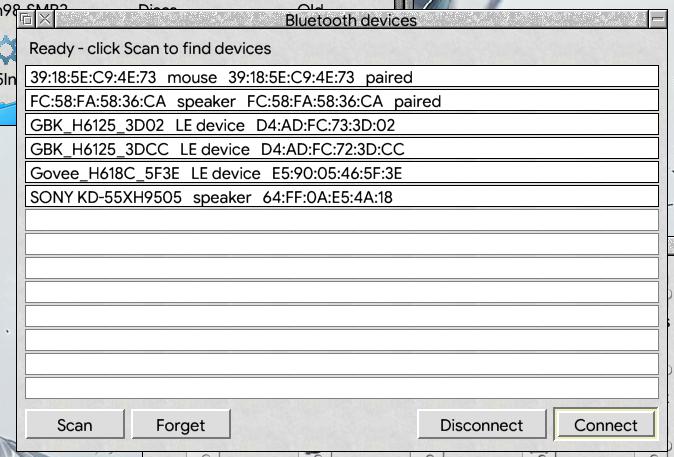
The Shield desktop: the Configuration window, a Bluetooth devices window and weather and news widgets over a pale crystal wallpaper

The archive also carries !ThmeSetup, a new !ThemeDefs application. It switches theme straight away instead of waiting for a reboot, and it lets you set the font size the desktop uses.

To install, copy the Shield folder into the Themes folder inside your !ThemeDefs, then choose it in !ThmeSetup.

Shield Theme is on the downloads page, 4.6 MB.

no comments

<12>

Search

Spinner

Get RISC OS One

Frosted ROMs for Raspberry Pi, Iyonix, iMX6 and Titanium, plus the HardDisc4 image and the Frosted theme.

Browse downloads

Programmer's Reference

Find the RISC OS 5 Programmer's Reference Manuals and RISC OS One guides in Documents.

RISC OS Technologies

RISC OS One is built and maintained by RISC OS Technologies. About us · Contact

RISC OS IPR

RISC OS is an open source operating system owned by RISC OS Developments Ltd and licensed primarily under the Apache 2.0 licence.


Contact us  |  About us  |  Licences

Site design © RISC OS Technologies 2026 except where indicated

Built on Ruby on Rails